Salesmate’s latest updates make it easier to respond automatically to customer activity and bring the CRM experience to more teams worldwide.
You can now trigger Smart Flows when subscription preferences change or when someone replies to a ticket. We’re also introducing French as the first step toward a broader multilingual Salesmate experience.
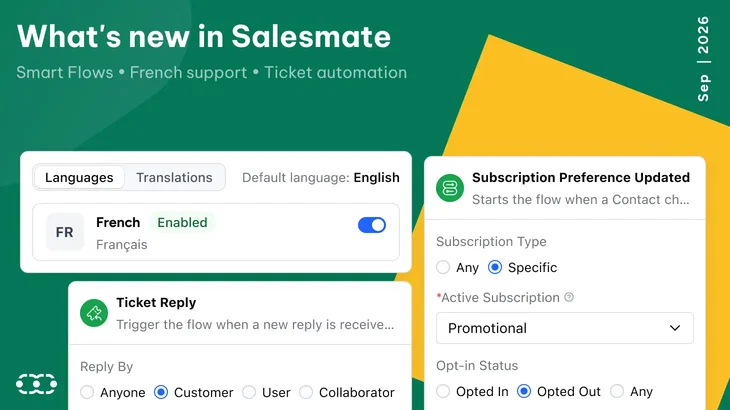
Smart Flow trigger: Subscription preference updated
Customer communication preferences change over time. Salesmate can now trigger a Smart Flow as soon as a contact updates a subscription preference.
Why it matters
An opt-in or opt-out can affect more than whether an email should be sent. It may also change audience membership, segmentation, workflows, follow-ups, or other communication processes.
Now, the preference change itself can start the appropriate automation.
What can you automate?
For example
Newsletter opt-in: Add the contact to the appropriate list or start a relevant workflow
Promotional email opt-out: Update communication preferences and remove the contact from related processes.
Preference change: Update the contact record and trigger actions based on the new subscription choice.
This helps your workflows stay aligned with each contact’s latest communication preferences without requiring manual monitoring.
For more info, check out: Support doc.
A new ticket reply often means something needs to happen next.
Salesmate can now trigger a Smart Flow whenever a new reply is received on an existing ticket.
Trigger based on who replied
Choose whether the Smart Flow should run when the reply comes from
- a customer
- a Salesmate user
- a collaborator
- or anyone
Why it matters
A customer reply might need to reopen a ticket, notify the owner, change its status, or start another process.
A collaborator reply may require an internal follow-up or escalation.
Instead of depending on someone to notice every new response, the reply itself can trigger the next action.
What can you automate?
Use the trigger to:
- update ticket status;
- assign or reassign ownership;
- notify users;
- create follow-up activities;
- escalate tickets;
- or start another workflow.
This helps ticket processes move forward as soon as the conversation changes.
For more info, check out: Support doc.
Salesmate is now available in French.
French-speaking users can switch the CRM interface to French and work in a more familiar experience across their everyday Salesmate workflows.
But this update represents something bigger.
French is our first step toward making Salesmate a multilingual platform.
As Salesmate continues to serve teams across different regions, we want the CRM experience to become more accessible to users working in different languages.
We’ll continue improving the French experience and expanding multilingual support over time.
More to come
These updates are part of a broader effort to make Salesmate more responsive, more automated, and easier for teams around the world to use.
These updates align with broader 2027 CRM automation trends where teams start with a few high‑impact workflows, measure results, then expand, avoiding over‑automation and keeping processes aligned to business goals.
Together, these improvements help teams spend less time managing routine communication and more time building meaningful customer relationships.
Ready to explore what's new in Salesmate?
If you'd like to see these features in action for your mid‑market team, Book a demo with a Salesmate specialist.






Key takeaways
Salesmate’s latest updates make it easier to respond automatically to customer activity and bring the CRM experience to more teams worldwide.
You can now trigger Smart Flows when subscription preferences change or when someone replies to a ticket. We’re also introducing French as the first step toward a broader multilingual Salesmate experience.
Smart Flow trigger: Subscription preference updated
Customer communication preferences change over time. Salesmate can now trigger a Smart Flow as soon as a contact updates a subscription preference.
Why it matters
An opt-in or opt-out can affect more than whether an email should be sent. It may also change audience membership, segmentation, workflows, follow-ups, or other communication processes.
Now, the preference change itself can start the appropriate automation.
What can you automate?
For example
Newsletter opt-in: Add the contact to the appropriate list or start a relevant workflow
Promotional email opt-out: Update communication preferences and remove the contact from related processes.
Preference change: Update the contact record and trigger actions based on the new subscription choice.
This helps your workflows stay aligned with each contact’s latest communication preferences without requiring manual monitoring.
Smart Flow trigger: Ticket reply
A new ticket reply often means something needs to happen next.
Salesmate can now trigger a Smart Flow whenever a new reply is received on an existing ticket.
Trigger based on who replied
Choose whether the Smart Flow should run when the reply comes from
Why it matters
A customer reply might need to reopen a ticket, notify the owner, change its status, or start another process.
A collaborator reply may require an internal follow-up or escalation.
Instead of depending on someone to notice every new response, the reply itself can trigger the next action.
What can you automate?
Use the trigger to:
This helps ticket processes move forward as soon as the conversation changes.
3. French language support
Salesmate is now available in French.
French-speaking users can switch the CRM interface to French and work in a more familiar experience across their everyday Salesmate workflows.
But this update represents something bigger.
French is our first step toward making Salesmate a multilingual platform.
As Salesmate continues to serve teams across different regions, we want the CRM experience to become more accessible to users working in different languages.
We’ll continue improving the French experience and expanding multilingual support over time.
More to come
These updates are part of a broader effort to make Salesmate more responsive, more automated, and easier for teams around the world to use.
These updates align with broader 2027 CRM automation trends where teams start with a few high‑impact workflows, measure results, then expand, avoiding over‑automation and keeping processes aligned to business goals.
Together, these improvements help teams spend less time managing routine communication and more time building meaningful customer relationships.
Ready to explore what's new in Salesmate?
If you'd like to see these features in action for your mid‑market team, Book a demo with a Salesmate specialist.
Shivani Tripathi
Shivani TripathiShivani is a passionate writer who found her calling in storytelling and content creation. At Salesmate, she collaborates with a dynamic team of creators to craft impactful narratives around marketing and sales. She has a keen curiosity for new ideas and trends, always eager to learn and share fresh perspectives. Known for her optimism, Shivani believes in turning challenges into opportunities. Outside of work, she enjoys introspection, observing people, and finding inspiration in everyday moments.