This September, we’re introducing three practical updates to Salesmate that help teams work with more control and less friction.
From managing marketing email frequency across campaigns to bringing historical support tickets into Salesmate and filtering CRM data more efficiently, these updates make everyday customer workflows easier to manage.
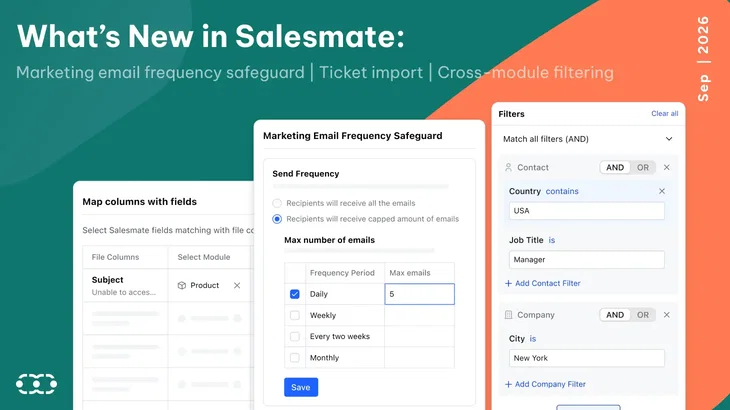
With the Marketing Email Frequency Safeguard, you can manage how often contacts receive eligible marketing emails.
Ticket Import helps you bring existing support records into Salesmate using a CSV file.
Meanwhile, Faster Cross-Module Filtering improves filtering performance and makes complex filter conditions easier to navigate.
Here’s a closer look at what’s new.
Marketing email frequency safeguard
As marketing teams run more campaigns, newsletters, nurture journeys, and promotional emails, it becomes harder to manage the total number of messages a single contact receives.
The challenge is that each campaign may be set up correctly on its own, but contacts experience all of those campaigns together.
Someone could receive a newsletter today, a promotional email tomorrow, and another nurture email shortly after, even though no individual campaign appears excessive.
That can quickly lead to email fatigue, lower engagement, more unsubscribes, and in some cases, damage to your sender reputation.
With the new Marketing Email Frequency Safeguard, you can set a maximum number of marketing emails a contact can receive within a specific time period.
For example, you may decide that no contact should receive more than three marketing emails in seven days. Once the limit is reached, Salesmate can stop additional marketing emails from being sent during that period.
This gives marketing teams a much more reliable way to control the overall customer experience.
Instead of depending on individual campaign owners to coordinate schedules manually, you can set a clear boundary that applies across your marketing communication.
The result is simple: your team can continue running multiple campaigns while reducing the risk of overwhelming the people receiving them.
Why it matters
When multiple campaigns are running, it's easy for contacts to receive several marketing emails within a short period.
The Marketing Email Frequency Safeguard helps teams manage email frequency across their marketing communication, reducing the risk of overwhelming contacts while maintaining a more consistent communication cadence.
Keep email frequency under control
To learn more about the Marketing Email Frequency Safeguard and see how it works in practice.
Ticket import
Moving from one support platform to another is rarely just about setting up new workflows. For many businesses, one of the biggest concerns is what happens to the years of customer conversations and support history already stored in the old system.
Starting fresh may be easy, but losing that history can leave support teams without the context they need when an existing customer gets in touch again.
With the new Ticket Import feature, you can import your existing tickets into Salesmate using a CSV file, making it easier to bring historical support information with you instead of recreating records manually or leaving them behind.
That history can be extremely valuable. Previous tickets often show what problems a customer has faced, what solutions were already tried, how issues were resolved, and whether the same problem has happened before.
With that context, agents can understand the situation faster and avoid asking customers to repeat information they have already shared.
It also creates a more connected support experience because the team can see the relationship with the customer, not just the latest conversation.
For businesses moving their support operations into Salesmate, Ticket Import reduces the effort involved in migration and helps teams get started with useful customer history already in place.
Why it matters
Moving to a new support platform can leave teams with years of valuable ticket history to deal with.
Ticket Import makes it easier to bring that existing support history into Salesmate, so your team can continue working with previous customer records instead of starting from scratch.
Learn more about import using a file
Faster cross-module filtering
We’ve improved the way Salesmate handles filters that use data from multiple modules, such as Contacts, Companies, and Deals.
Cross-module filtering is now more efficient, especially for workspaces with large amounts of data. We’ve also updated the filter builder to organize conditions more clearly by module, making complex filters easier to follow.
The result is faster searches, better performance on large datasets, and a filtering experience that is better equipped to scale as your CRM grows.
Why it matters
Finding specific records across related CRM modules becomes more challenging as your database grows.
Improved cross-module filtering helps teams work with large datasets more efficiently, while the clearer filter builder makes complex conditions easier to understand and manage. This supports smoother cross-module searches as your workspace scales.
More control across your customer workflows
This month’s updates address two everyday needs: managing marketing email frequency and bringing existing support history into Salesmate.
Whether you’re running multiple marketing email campaigns or moving your support data from another platform, these updates give your team more control over how customer communication and ticket history are managed in Salesmate.
Curious how these updates work?
See the new email controls, ticket import, and cross-module filtering features in action with a Salesmate demo.






Key takeaways
This September, we’re introducing three practical updates to Salesmate that help teams work with more control and less friction.
From managing marketing email frequency across campaigns to bringing historical support tickets into Salesmate and filtering CRM data more efficiently, these updates make everyday customer workflows easier to manage.
With the Marketing Email Frequency Safeguard, you can manage how often contacts receive eligible marketing emails.
Ticket Import helps you bring existing support records into Salesmate using a CSV file.
Meanwhile, Faster Cross-Module Filtering improves filtering performance and makes complex filter conditions easier to navigate.
Here’s a closer look at what’s new.
Marketing email frequency safeguard
As marketing teams run more campaigns, newsletters, nurture journeys, and promotional emails, it becomes harder to manage the total number of messages a single contact receives.
The challenge is that each campaign may be set up correctly on its own, but contacts experience all of those campaigns together.
Someone could receive a newsletter today, a promotional email tomorrow, and another nurture email shortly after, even though no individual campaign appears excessive.
That can quickly lead to email fatigue, lower engagement, more unsubscribes, and in some cases, damage to your sender reputation.
With the new Marketing Email Frequency Safeguard, you can set a maximum number of marketing emails a contact can receive within a specific time period.
For example, you may decide that no contact should receive more than three marketing emails in seven days. Once the limit is reached, Salesmate can stop additional marketing emails from being sent during that period.
This gives marketing teams a much more reliable way to control the overall customer experience.
Instead of depending on individual campaign owners to coordinate schedules manually, you can set a clear boundary that applies across your marketing communication.
The result is simple: your team can continue running multiple campaigns while reducing the risk of overwhelming the people receiving them.
Why it matters
When multiple campaigns are running, it's easy for contacts to receive several marketing emails within a short period.
The Marketing Email Frequency Safeguard helps teams manage email frequency across their marketing communication, reducing the risk of overwhelming contacts while maintaining a more consistent communication cadence.
Keep email frequency under control
To learn more about the Marketing Email Frequency Safeguard and see how it works in practice.
Ticket import
Moving from one support platform to another is rarely just about setting up new workflows. For many businesses, one of the biggest concerns is what happens to the years of customer conversations and support history already stored in the old system.
Starting fresh may be easy, but losing that history can leave support teams without the context they need when an existing customer gets in touch again.
With the new Ticket Import feature, you can import your existing tickets into Salesmate using a CSV file, making it easier to bring historical support information with you instead of recreating records manually or leaving them behind.
That history can be extremely valuable. Previous tickets often show what problems a customer has faced, what solutions were already tried, how issues were resolved, and whether the same problem has happened before.
With that context, agents can understand the situation faster and avoid asking customers to repeat information they have already shared.
It also creates a more connected support experience because the team can see the relationship with the customer, not just the latest conversation.
For businesses moving their support operations into Salesmate, Ticket Import reduces the effort involved in migration and helps teams get started with useful customer history already in place.
Why it matters
Moving to a new support platform can leave teams with years of valuable ticket history to deal with.
Ticket Import makes it easier to bring that existing support history into Salesmate, so your team can continue working with previous customer records instead of starting from scratch.
Learn more about import using a file
Faster cross-module filtering
We’ve improved the way Salesmate handles filters that use data from multiple modules, such as Contacts, Companies, and Deals.
Cross-module filtering is now more efficient, especially for workspaces with large amounts of data. We’ve also updated the filter builder to organize conditions more clearly by module, making complex filters easier to follow.
The result is faster searches, better performance on large datasets, and a filtering experience that is better equipped to scale as your CRM grows.
Why it matters
Finding specific records across related CRM modules becomes more challenging as your database grows.
Improved cross-module filtering helps teams work with large datasets more efficiently, while the clearer filter builder makes complex conditions easier to understand and manage. This supports smoother cross-module searches as your workspace scales.
More control across your customer workflows
This month’s updates address two everyday needs: managing marketing email frequency and bringing existing support history into Salesmate.
Whether you’re running multiple marketing email campaigns or moving your support data from another platform, these updates give your team more control over how customer communication and ticket history are managed in Salesmate.
Curious how these updates work?
See the new email controls, ticket import, and cross-module filtering features in action with a Salesmate demo.
Shivani Tripathi
Shivani TripathiShivani is a passionate writer who found her calling in storytelling and content creation. At Salesmate, she collaborates with a dynamic team of creators to craft impactful narratives around marketing and sales. She has a keen curiosity for new ideas and trends, always eager to learn and share fresh perspectives. Known for her optimism, Shivani believes in turning challenges into opportunities. Outside of work, she enjoys introspection, observing people, and finding inspiration in everyday moments.