What’s new: You can now add a cover page to quote templates.
Why it helps: Cover pages help you present your quote like a proposal - making a stronger first impression and giving customers context before they see pricing.
How you’ll use it:
- Add a short introduction (who you are, what you’re proposing).
- Include scope summary, goals, timeline, and deliverables.
- Add “Next steps” or a call - to - action (e.g., sign, approve, schedule a call).
Where to find it: Quotes → Templates → Cover Page
✅ Use run-time variables in quotes (More dynamic templates)
What’s new: Quotes now support run-time variables to auto-fill content using CRM data.
Why it helps: You can reuse templates while keeping every quote personalized and accurate - without editing documents manually.
How you’ll use it:
- Auto-insert customer name and company name
- Pull deal owner, deal value, quote validity date, and custom fields.
- Standardize your quote format while keeping it personalized
Where to find it: Quotes → Templates → Variables
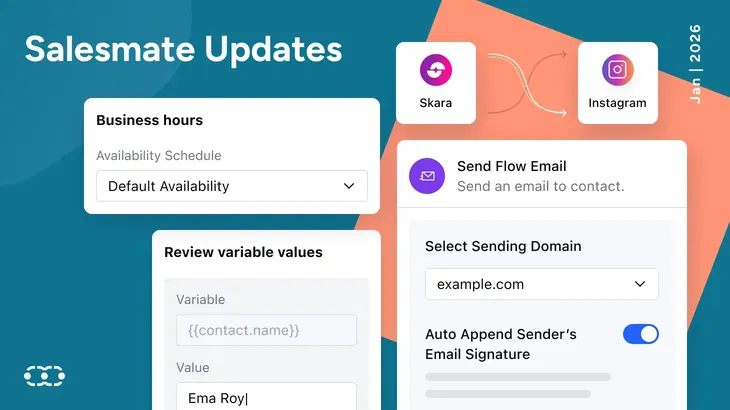
✅ Review variable values before sending/downloading
What’s new: You can now review and fix empty variables before sending or downloading a quote.
Why it helps: This prevents quotes from going out with missing fields (blank names, missing dates, incomplete details).
How you’ll use it:
- Preview all variable values before the quote goes out.
- Quickly identify missing fields and update them.
- Send cleaner, accurate quotes with confidence.
Where to find it: Quotes → Preview/Send → Variable Review
✅ Improved pricing tables
What’s new: Pricing tables are improved with better formatting and typography options.
Why it helps: Customers can understand packages and totals faster, reducing confusion and speeding up approvals.
How you’ll use it:
- Present packages with a clearer structure.
- Make add-ons and totals easier to scan.
- Keep pricing professional and consistent.
Where to find it: Quotes → Templates → Pricing Table
2) AI agents: New Instagram channel + meeting actions
✅ AI agents on Instagram DMs
What’s new: Instagram is now available as a channel for AI Agents.
Why it helps: Your agent can respond instantly on Instagram - helping you engage leads faster and reduce missed conversations.
How you’ll use it:
- Auto-reply to common questions in Instagram DMs
- Share product/service details instantly.
- Qualify leads and route high-intent conversations to your team
Where to find it: AI Agents → Channels → Instagram
✅ New agent tools: Reschedule or cancel meetings
What’s new: Agents can now modify (reschedule) or cancel meetings over chat or call.
Why it helps: Customers can change bookings without back - and - forth, and your team saves time on scheduling coordination.
How you’ll use it:
- Allow customers to say: “Reschedule to tomorrow” or “Cancel my meeting”.
- Let the agent update the booking automatically.
- Send confirmation instantly so everyone stays aligned.
Where to find it: AI Agents → Tools → Meeting Scheduler
3) Communication & unified inbox: More context, faster replies
✅ Improved email widget
What’s new: The email widget now shows delivery status, tracking information, and the channel used to send the email.
Why it helps: When you’re following up on a deal, you can quickly see what happened without digging into logs.
Where to find it: Contacts/Deals → Email Widget
✅ Unified inbox improvements
What’s new in Inbox:
- Cross-workspace conversations so you can manage conversations in one place while keeping context
- WhatsApp contextual replies so you can reply to a specific message inside a thread
Why it helps: Conversations stay clearer, and teams waste less time switching between workspaces or guessing context.
Where to find it: Unified Inbox
✅ Unified business hours for chat + meetings
What’s new: Business Hours is now merged for chat and meeting schedulers.
Why it helps: You set availability once, and it stays consistent everywhere - reducing misalignment and missed expectations.
Where to find it: Setup → Business Hours
✅ More helpful text message failure errors
What’s new: There are times when a text message sending fails from the service provider’s end, and when it happens, you’ll now see a clearer failure of reason with context.
Why it helps: Troubleshooting is faster because you get actionable error details instead of a generic failure message.
Where to find it: Text Messaging → Delivery/Failure status view
4) Smart flows: More automation, easier debugging
✅ Email deal participants
What’s new: Smart Flows can now send email updates to deal participants automatically.
Why it helps: Everyone involved in a deal stays aligned without manual follow-ups.
Where to find it: Smart Flows → Actions → Send Email to Deal Participants
✅ Add multiple recipients in send internal emails
What’s new: You can add one or more internal recipients using comma-separated email addresses.
Why it helps: You can loop in sales, finance, or leadership without building extra steps.
Where to find it: Smart Flows → Actions → Send Internal Email
✅ View parent flow in enrollment logs
What’s new: Enrollment Logs now show the parent flow for a sub-flow.
Why it helps: Debugging becomes faster because you can trace exactly where the flow started.
Where to find it: Smart Flows → Enrollment Logs
✅ Domain selection for send flow email
What’s new: You can choose a specific sending domain for flow emails.
Why it helps: Better control over deliverability by brand/region/campaign and cleaner sending reputation management.
Where to find it: Smart Flows → Send Flow Email → Domain Selection
5) Knowledge base: Consolidated and easier to manage
✅ Knowledge base UI/UX revamp
What’s new: Knowledge Base has been reorganized and consolidated so you can manage content from one place.
Why it helps: It’s easier to keep support content accurate when articles, external URLs, and docs are accessible in one unified view.
Where to find it: Knowledge Base
6) Xero integration update (Action required)
What’s new: We’ve upgraded the Xero integration version and updated the authorization mechanism.
Why it helps: This improves reliability and ensures the integration stays compatible going forward.
What you need to do: Some users may need to complete a one-time re-authorization / migration during the upgrade.
Recommended action: Please follow the support documentation and upgrade your Xero integration version to avoid any sync interruption.
Support doc
Closing Note
With every release, Salesmate moves closer to becoming the single platform your team can rely on for polished communication, smarter automation, and effortless growth.
This January update strengthens the core of daily work, from professional quotes and responsive AI Agents to inbox clarity and automation that keeps everyone aligned without constant follow-ups.
When your documents are dynamic, your conversations stay contextual, and your workflows run quietly in the background, your customer journey becomes stronger at every step.
That’s the power of building inside Salesmate. Less manual effort. Fewer missed moments. More time focused on growth.
You can quickly access the latest release notes and product updates at any time through the gift icon in the app, making it easy to stay informed about new features and improvements.
Explore what’s new in Salesmate this January and start 2026 with smarter workflows from day one. Start your free trial today!






Some updates help you move faster. Others change how you show up in front of customers. This January, Salesmate delivers a set of improvements that do both.
Announcing big product updates, new releases, and recent updates can attract new customers and bring back churned users who see that new updates have addressed their previous concerns.
We’re kicking off 2026 with updates that help you deliver more professional quotes, respond faster across channels, and reduce manual work through smarter automation.
This release improves Quotes & Templates, AI Agents, Unified Inbox, Smart Flows, Knowledge Base, and the Xero integration.
1) Quotes & document templates: More polished, more dynamic
✅ Add cover pages to quotes
What’s new: You can now add a cover page to quote templates.
Why it helps: Cover pages help you present your quote like a proposal - making a stronger first impression and giving customers context before they see pricing.
How you’ll use it:
Where to find it: Quotes → Templates → Cover Page
✅ Use run-time variables in quotes (More dynamic templates)
What’s new: Quotes now support run-time variables to auto-fill content using CRM data.
Why it helps: You can reuse templates while keeping every quote personalized and accurate - without editing documents manually.
How you’ll use it:
Where to find it: Quotes → Templates → Variables
✅ Review variable values before sending/downloading
What’s new: You can now review and fix empty variables before sending or downloading a quote.
Why it helps: This prevents quotes from going out with missing fields (blank names, missing dates, incomplete details).
How you’ll use it:
Where to find it: Quotes → Preview/Send → Variable Review
✅ Improved pricing tables
What’s new: Pricing tables are improved with better formatting and typography options.
Why it helps: Customers can understand packages and totals faster, reducing confusion and speeding up approvals.
How you’ll use it:
Where to find it: Quotes → Templates → Pricing Table
2) AI agents: New Instagram channel + meeting actions
✅ AI agents on Instagram DMs
What’s new: Instagram is now available as a channel for AI Agents.
Why it helps: Your agent can respond instantly on Instagram - helping you engage leads faster and reduce missed conversations.
How you’ll use it:
Where to find it: AI Agents → Channels → Instagram
✅ New agent tools: Reschedule or cancel meetings
What’s new: Agents can now modify (reschedule) or cancel meetings over chat or call.
Why it helps: Customers can change bookings without back - and - forth, and your team saves time on scheduling coordination.
How you’ll use it:
Where to find it: AI Agents → Tools → Meeting Scheduler
3) Communication & unified inbox: More context, faster replies
✅ Improved email widget
What’s new: The email widget now shows delivery status, tracking information, and the channel used to send the email.
Why it helps: When you’re following up on a deal, you can quickly see what happened without digging into logs.
Where to find it: Contacts/Deals → Email Widget
✅ Unified inbox improvements
What’s new in Inbox:
Why it helps: Conversations stay clearer, and teams waste less time switching between workspaces or guessing context.
Where to find it: Unified Inbox
✅ Unified business hours for chat + meetings
What’s new: Business Hours is now merged for chat and meeting schedulers.
Why it helps: You set availability once, and it stays consistent everywhere - reducing misalignment and missed expectations.
Where to find it: Setup → Business Hours
✅ More helpful text message failure errors
What’s new: There are times when a text message sending fails from the service provider’s end, and when it happens, you’ll now see a clearer failure of reason with context.
Why it helps: Troubleshooting is faster because you get actionable error details instead of a generic failure message.
Where to find it: Text Messaging → Delivery/Failure status view
4) Smart flows: More automation, easier debugging
✅ Email deal participants
What’s new: Smart Flows can now send email updates to deal participants automatically.
Why it helps: Everyone involved in a deal stays aligned without manual follow-ups.
Where to find it: Smart Flows → Actions → Send Email to Deal Participants
✅ Add multiple recipients in send internal emails
What’s new: You can add one or more internal recipients using comma-separated email addresses.
Why it helps: You can loop in sales, finance, or leadership without building extra steps.
Where to find it: Smart Flows → Actions → Send Internal Email
✅ View parent flow in enrollment logs
What’s new: Enrollment Logs now show the parent flow for a sub-flow.
Why it helps: Debugging becomes faster because you can trace exactly where the flow started.
Where to find it: Smart Flows → Enrollment Logs
✅ Domain selection for send flow email
What’s new: You can choose a specific sending domain for flow emails.
Why it helps: Better control over deliverability by brand/region/campaign and cleaner sending reputation management.
Where to find it: Smart Flows → Send Flow Email → Domain Selection
5) Knowledge base: Consolidated and easier to manage
✅ Knowledge base UI/UX revamp
What’s new: Knowledge Base has been reorganized and consolidated so you can manage content from one place.
Why it helps: It’s easier to keep support content accurate when articles, external URLs, and docs are accessible in one unified view.
Where to find it: Knowledge Base
6) Xero integration update (Action required)
What’s new: We’ve upgraded the Xero integration version and updated the authorization mechanism.
Why it helps: This improves reliability and ensures the integration stays compatible going forward.
What you need to do: Some users may need to complete a one-time re-authorization / migration during the upgrade.
Recommended action: Please follow the support documentation and upgrade your Xero integration version to avoid any sync interruption.
Support doc
Closing Note
With every release, Salesmate moves closer to becoming the single platform your team can rely on for polished communication, smarter automation, and effortless growth.
This January update strengthens the core of daily work, from professional quotes and responsive AI Agents to inbox clarity and automation that keeps everyone aligned without constant follow-ups.
When your documents are dynamic, your conversations stay contextual, and your workflows run quietly in the background, your customer journey becomes stronger at every step.
That’s the power of building inside Salesmate. Less manual effort. Fewer missed moments. More time focused on growth.
You can quickly access the latest release notes and product updates at any time through the gift icon in the app, making it easy to stay informed about new features and improvements.
Explore what’s new in Salesmate this January and start 2026 with smarter workflows from day one. Start your free trial today!
Pawan Kumar
Digital Marketing ManagerMarketing Head at Salesmate | Digital Storyteller | Poll Enthusiast | 📈 Data-Driven Innovator | Building bridges between tech and people with engaging content, stories, and creative marketing strategies. Let's turn ideas into impact! 🌟